5 Hidden Features of the Pagewide Pro 577Dw You Must Know About
In the landscape of modern office equipment, the HP PageWide Pro 577dw stands as a bridge between the traditional inkjet and the heavy-duty laser printer. While most office managers and IT professionals are aware of its headline specifications—such as its blistering print speeds and high-yield cartridges—there is a layer of functionality beneath the surface that often goes untapped. This device is powered by PageWide Technology, which utilizes a stationary print bar that spans the entire width of the page. This design allows it to deliver performance that rivals high-end laser printers while maintaining the cost-efficiency and energy-saving benefits of inkjet technology.
For businesses looking to maximize their return on investment, understanding the nuances of this hardware is essential. It is not merely a peripheral for outputting documents; it is a sophisticated document processing hub capable of deep integration into professional workflows. Beyond the standard copy and print functions, the 577dw houses features designed to enhance security, streamline scanning, and reduce the total cost of ownership. This article explores five hidden features and technical advantages of the PageWide Pro 577dw that can transform it from a standard printer into a strategic asset for any busy workgroup.
Detailed Product Analysis: The PageWide Revolution
At its core, the PageWide Pro 577dw is built for speed and reliability. Unlike a traditional inkjet printer where the print head moves back and forth across the paper, the PageWide print bar contains thousands of tiny nozzles that remain stationary. As the paper passes underneath the bar in a single pass, the image is formed instantly. This architectural choice eliminates the mechanical vibration and noise associated with moving print heads, leading to a quieter office environment and significantly faster "First Page Out" times. In many real-world scenarios, the 577dw can wake from sleep and finish a page before a traditional laser printer has even finished warming up its fuser.
Buyers typically prioritize three main factors when choosing a workgroup printer: speed, print quality, and running costs. The 577dw addresses these by offering up to 50 pages per minute (ppm) in professional mode and up to 70 ppm in General Office mode. The print quality is exceptionally sharp, thanks to pigmented inks that are water-resistant and smudge-proof, making them suitable for official legal documents and high-quality marketing materials. However, the true value lies in the hidden capabilities that make managing these tasks easier for the end-user and the IT department alike.
From a maintenance perspective, the device is designed with fewer moving parts than a laser printer. There are no drums, fusers, or transfer belts to replace. This simplicity translates to higher uptime and less packaging waste. When combined with the high-capacity ink cartridges—which can yield up to 17,000 pages for black and 13,000 for color—the 577dw becomes a powerhouse for high-volume environments that cannot afford frequent interruptions for supply changes.
1. Proactive Security with HP Sure Start
In an era where cybersecurity threats often target "soft" entry points like networked printers, the HP PageWide Pro 577dw includes a sophisticated security layer that many users never realize is running. One of the most critical hidden features is the integration of HP Sure Start technology. This BIOS protection system continuously monitors the printer's startup code. If the device detects that the BIOS has been compromised by a malicious attack or a corrupted firmware update, it can automatically "heal" itself by rebooting with a clean, golden copy of the BIOS.
For an IT administrator, this feature is invaluable. It provides a foundational level of security that operates below the operating system level, ensuring that the printer does not become a persistent gateway for hackers to enter the corporate network. Furthermore, the 577dw supports runtime intrusion detection. While the printer is active, it monitors memory patterns to detect and stop attacks in real-time. This level of security is typically reserved for enterprise-grade managed printers, but HP filtered it down into the PageWide Pro series to protect small and medium-sized businesses.
Users can also utilize the "Pin Printing" feature. By assigning a secure PIN to a print job through the driver, the document remains in the printer’s memory and is only released when the user physically enters the code on the 4.3-inch touchscreen. This prevents sensitive payroll information or confidential contracts from sitting in the output tray for others to see, which is a common compliance requirement in medical and legal fields.
2. Advanced Scan-to-Network and OCR Workflows
Most users are familiar with the basic scanning function of a multifunction printer (MFP), but the 577dw offers advanced digital sending capabilities that can replace dedicated desktop scanners. The device features a single-pass, duplex-capable Automatic Document Feeder (ADF). This means it scans both sides of a page simultaneously, preventing the paper jams often caused by mechanical "reversing" feeders. This hardware is complemented by software features that allow for "Scan to Email," "Scan to Network Folder," and "Scan to SharePoint."
Looking for the best Electronics deals on Amazon?
See Deals →A hidden gem within these settings is the ability to create customized Quick Sets. An office manager can program a button on the home screen that, when pressed, scans a document, applies specific image enhancements (such as removing background bleed-through), and sends it to a specific folder on the company server. This eliminates the need for users to manually navigate complex menu trees every time they need to archive an invoice or a signed contract.
Furthermore, the printer can be configured to perform basic Optical Character Recognition (OCR) when used in conjunction with HP's software suite. This transforms scanned images into searchable PDFs or editable text documents. In a busy law firm or accounting office, the ability to search for a specific name or date across 500 scanned pages is a massive productivity boost that far outweighs the simple act of "making a digital copy."
3. General Office Mode: The Cost-Saving Secret
While the PageWide Pro 577dw is marketed for its professional quality, many businesses overspend on ink by using the "Professional" or "Presentation" settings for internal documents. The "General Office" (GO) mode is a hidden feature in the print settings that can drastically reduce ink consumption and increase print speed to its maximum of 70 ppm. Unlike "Draft" modes on older inkjet printers, which often resulted in faint, streaky text, the GO mode on a PageWide device remains highly legible and suitable for most internal business communications.
The GO mode works by optimizing the ink density. Because the ink is pigmented and dries instantly, the text remains crisp. For companies printing hundreds of emails, internal memos, or shipping manifests daily, switching to GO mode can extend the life of an ink cartridge by up to 30%. When you consider that a full set of high-yield cartridges represents a significant investment, this simple setting change can save a business thousands of dollars over the lifespan of the machine.
IT managers can also set this as the default mode via the Web Jetadmin software or the printer's Internal Web Server (EWS). Users can still override the setting for client-facing materials, but by making the most efficient mode the default, the organization ensures a lower carbon footprint and a healthier bottom line without sacrificing the utility of the device.
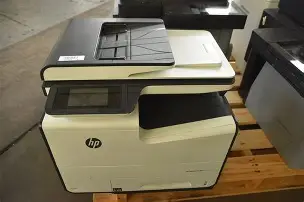
4. The Hidden Power of the Embedded Web Server (EWS)
Most people interact with the printer through the physical touchscreen or the print driver on their computer. However, the most powerful way to manage the PageWide Pro 577dw is through its Embedded Web Server. By entering the printer's IP address into a web browser, administrators gain access to a treasure trove of diagnostic data and configuration options that are not available on the small physical screen.
Within the EWS, you can find the "Settings" and "Reports" tabs which provide granular detail on usage patterns. You can see exactly how many pages have been printed in color versus monochrome, the average ink coverage per page, and even the "health" of each individual nozzle on the print bar. If the printer is experiencing minor quality issues, the EWS allows you to trigger deep-cleaning cycles or alignment procedures remotely, saving a trip to the printer's physical location.
The EWS also allows for advanced energy management. You can schedule the printer to wake up at 8:00 AM and enter a deep sleep mode at 6:00 PM. While the 577dw is already exceptionally energy-efficient compared to laser printers (which require high heat to fuse toner), managing the sleep cycles via the EWS further reduces "vampire" power draw. This is an essential feature for businesses aiming for green certifications or those simply trying to manage utility costs in a large office suite.
Discover deals on Electronics — updated daily.
Shop Amazon →5. USB Walk-up Printing and Microsoft Integration
In a fast-paced environment, sometimes the bottleneck is the time it takes to log into a computer and open a file just to print a single document. The PageWide Pro 577dw features a "walk-up" USB port conveniently located on the front of the chassis. While many printers can print JPEGs from a thumb drive, the 577dw has the horsepower to render and print Microsoft Word and PowerPoint files directly from the USB drive.
This is made possible by the printer's internal processor and memory, which can interpret the complex formatting of Office documents without needing a PC as an intermediary. For a salesperson rushing into a meeting or a consultant arriving at a client site, being able to plug in a drive and print a presentation directly from the printer's interface is a major convenience. Similarly, the 577dw supports "JetAdvantage Private Print," which allows users to upload documents to a secure cloud queue and pull them down to any compatible HP printer they are currently standing in front of, using their mobile device for authentication.
Pros and Cons of the PageWide Pro 577Dw
- Pro: Industry-Leading Speed - With speeds up to 70 ppm, it outperforms almost every laser printer in its price bracket, making it ideal for high-volume environments.
- Pro: Low Total Cost of Ownership - High-yield cartridges and low energy consumption make it one of the most cost-effective MFPs for medium-sized workgroups.
- Pro: Professional Print Quality - Pigmented inks provide archival-quality text and vibrant graphics that are resistant to water and highlighters.
- Pro: Superior Paper Handling - The 500-sheet main tray and 50-sheet multi-purpose tray can be expanded with an optional 500-sheet accessory tray for a total capacity of 1,050 sheets.
- Con: Initial Footprint - The device is somewhat bulky compared to entry-level inkjets, requiring a sturdy desk or a dedicated printer stand.
- Con: Ink Cost Sensitivity - While the per-page cost is low, the upfront cost of a full set of high-yield replacement cartridges can be high.
- Con: Software Overhead - To access the full range of scanning and OCR features, users need to install the full HP software suite, which some might find cumbersome.
Technical Comparison: PageWide vs. Laser vs. Traditional Inkjet
| Feature | HP PageWide Pro 577dw | Standard Color Laser | Consumer Inkjet |
|---|---|---|---|
| Print Technology | Stationary Print Bar | Laser/Toner Fusing | Moving Print Head |
| Max Speed (Color) | Up to 70 ppm | 25 - 35 ppm | 10 - 20 ppm |
| First Page Out | As fast as 6 seconds | 10 - 15 seconds | 15+ seconds |
| Energy Use | Very Low (No Heat) | High (Fuser Warm-up) | Low |
| Ink/Toner Type | Pigmented (Smudge-proof) | Dry Powder | Dye-based (Water sensitive) |
| Maintenance Parts | Print Bar only | Drum, Fuser, Belt | Print Head, Waste Ink Pad |
Buying Guide: Is the PageWide Pro 577Dw Right for You?
When considering the 577dw, it is important to evaluate your monthly print volume. This machine is designed for a "Sweet Spot" of 1,000 to 4,500 pages per month. If you print fewer than 500 pages a month, you may not see the financial benefits of the high-yield cartridges, and the stationary print bar technology might be overkill. However, for a small medical practice, a busy real estate office, or a satellite corporate department, the 577dw is arguably the most efficient tool on the market.
Current buyers should look for the "dw" designation, which indicates the inclusion of Dual-band Wi-Fi and Wi-Fi Direct. This allows visitors to print from their mobile devices without needing access to the secure corporate network—a frequent requirement in modern office settings. Additionally, check the firmware version upon setup; HP frequently releases updates that improve the security features and the responsiveness of the touchscreen interface.
Another consideration is the type of media you use. While PageWide technology works on standard 20lb office paper, it truly shines on papers with "ColorLok" technology. This ensures the pigment stays on the surface for maximum vibrance. If your business produces a lot of flyers or brochures in-house, investing in slightly higher-quality paper will allow the 577dw to produce results that look like they came from a professional print shop.
Finally, consider the logistical benefits of the footprint. Because the paper path is mostly internal and the cartridges are accessed from a front-loading door, the 577dw can be placed in tight corners or on shelving where a laser printer might struggle with side-ventilation or top-loading toner issues. Its quiet operation also makes it suitable for placement near reception desks or in open-plan offices where the "whir" of a standard printer can be a distraction.
Conclusion
The HP PageWide Pro 577dw is far more than a fast office printer. It represents a paradigm shift in how digital and physical documents are handled. By leveraging hidden features like HP Sure Start for foundational security, utilizing the Embedded Web Server for remote management, and optimizing costs through General Office mode, businesses can achieve a level of efficiency that was previously only possible with much larger, more expensive enterprise machines. Whether you are looking to secure your network, accelerate your scanning workflows, or simply cut down on the time your team spends waiting at the printer, the 577dw offers a hardware and software combination that remains a benchmark in the electronics world. Investing in the time to understand these deeper functionalities ensures that this device remains a reliable, high-performance cornerstone of your office infrastructure for years to come.